
Contact Q79 – Customer Support Channels and Assistance Guide
Contact Q79 provides convenient ways for players to seek assistance with account management, transactions, and online gaming services. Whether resolving login difficulties or checking payment-related questions, Q79 offers communication options through Live Chat, Telegram, and Facebook. These customer service channels help users in Myanmar access relevant guidance, submit inquiries, and understand how to resolve common issues while using the platform.
Available Customer Support Channels at Contact Q79
Q79 displays three communication icons representing Live Chat, Telegram, and Facebook. Each option serves a different communication purpose, making it important to understand how these channels work before submitting an inquiry. Choosing an appropriate channel helps players avoid confusion and locate relevant information more efficiently.
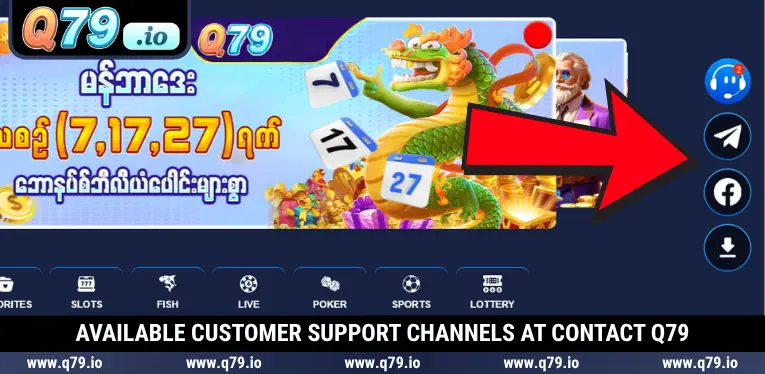
Live Chat for Direct Assistance on the Q79 Platform
Live Chat offers a convenient way to submit questions without leaving the website. By clicking the blue headset icon, players can open a support window containing predefined assistance categories and a message field. This feature is suitable for explaining login problems, transaction concerns, or gaming-related questions that require additional clarification.
Telegram for Updates and Online Communication
The Telegram icon provides another communication option associated with Q79. The Live Chat interface also includes a message encouraging users to follow a Telegram Channel for announcements and updates. Players should distinguish an announcement channel from a direct customer service account before sending personal inquiries, particularly those involving financial transactions.
Facebook for Brand Updates and Customer Inquiries
Facebook is another communication option displayed on the platform through its recognizable social media icon. Users can select this icon to inspect the connected page and look for relevant information about Q79. Where messaging is available, players may use it to ask general questions or request clarification about published announcements and platform services.
Step-by-Step Guide to Contact Q79 Through Live Chat
Live Chat is a practical option for players who need to describe a specific problem while using the website. Q79 provides a support window with categorized topics, allowing users to identify their concerns before sending a message. The process can be completed directly through a browser without installing additional communication applications.
- Step 1 – Visit the Q79 website: Open the official platform using a mobile or desktop browser and locate the communication icons along the interface. Verify that the website address is correct before sharing any account-related information.
- Step 2 – Open the Live Chat window: Click the blue headset icon to access the online consultation interface. A separate window will appear, displaying assistance topics, introductory messages, and a text field for submitting inquiries.
- Step 3 – Select the relevant support topic: Review the available categories and choose the option that most closely matches the problem. If no suitable category appears, describe the concern directly in the message field.
- Step 4 – Submit a clear support request: Explain the issue, including the actions already taken and any error messages displayed. Screenshots may help illustrate technical problems, provided that passwords and other sensitive information are concealed.
- Step 5 – Review the response and instructions: Monitor the conversation for additional messages or troubleshooting guidance. Avoid repeatedly submitting identical requests while an existing inquiry is being reviewed.
Common Issues Handled Through Contact Q79
The purpose of Contact Q79 extends beyond locating communication channels, covering practical assistance needs that arise during account management and online gaming. Players should identify their specific concerns before contacting support so the conversation remains focused and relevant information can be provided without unnecessary repetition.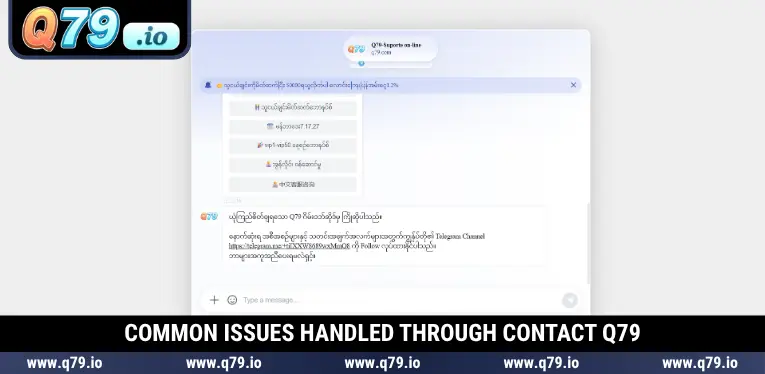
| Support Category | Common Issues and Assistance |
| Account registration | Incomplete registration forms, invalid details, and difficulties creating an account. |
| Account login | Forgotten passwords, login failures, and account access errors. |
| Deposits | Pending balance updates, deposit confirmation questions, and transaction status inquiries. |
| Withdrawals | Withdrawal requirements, pending requests, and transaction-related clarification. |
| Casino games | Loading problems, display errors, and questions about gameplay rules or features. |
| Promotions | Bonus eligibility, reward conditions, and wagering requirement inquiries. |
Preparing Information Before Contacting Q79 Support
Clear and accurate information helps make customer service conversations more efficient. When using Contact Q79, players should explain what happened, identify the affected feature, and prepare relevant details without disclosing unnecessary personal information. Different issues may require different types of information, particularly when account access or financial transactions are involved.
Essential Details for Account-Related Problems
Players experiencing login difficulties should prepare their account username, the approximate time of the issue, and any error message displayed on the screen. Q79 support can use these details to understand the reported situation and determine what additional information may be required. Passwords, one-time verification codes, and confidential login credentials should never be shared through chat messages.
Transaction Information for Deposit and Withdrawal Issues
For payment-related inquiries, useful information may include the transaction reference number, amount in Myanmar Kyat (MMK), submission time, and displayed transaction status. These details help distinguish between payments made at similar times and reduce confusion during troubleshooting. Supporting screenshots may be provided when necessary, but sensitive financial details should be concealed beforehand.
What to Do When Contact Q79 Has Not Responded
Response times may vary depending on the type of inquiry and the information required to investigate an issue. If Contact Q79 has not provided a response, players should first check their internet connection, confirm that the Live Chat window remains active, and verify that their original message was successfully submitted.
If the inquiry remains unresolved, users may inspect other communication options displayed on the website. Q79 recommends keeping the explanation consistent and referring to the previously submitted request where possible. For pending financial transactions, players should avoid repeating a deposit or withdrawal solely because the balance has not yet changed.
Important Security Precautions When Contacting Q79 Support
Protecting personal information is essential when communicating with online casino customer service representatives. Contact Q79 should be accessed through the website interface whenever possible, reducing the risk of interacting with impersonators or unfamiliar third-party accounts. Players must also verify communication channels before submitting sensitive details related to their accounts.
The following precautions are particularly important when contacting support through Live Chat, Telegram, or Facebook:
- Verify official communication channels: Access support icons directly from the Q79 website rather than trusting unsolicited messages or unfamiliar accounts. Fraudulent profiles may imitate casino branding to obtain personal information.
- Never disclose confidential credentials: Keep passwords, one-time verification codes, and account recovery information private during every conversation. Legitimate troubleshooting should not require users to reveal their complete login credentials.
- Protect financial and personal information: Remove unnecessary bank details, identification numbers, and sensitive transaction data from screenshots before submitting them. Share only the information relevant to resolving the reported issue.
- Avoid unauthorized payment requests: Do not transfer money to unfamiliar accounts based solely on instructions received through Telegram, Facebook, or private messages. Confirm any payment-related request through a trusted platform channel before taking action.
- Maintain records of important conversations: Save relevant transaction references, support responses, and troubleshooting instructions for future reference. These records may help explain an unresolved issue without requiring the entire situation to be repeated.
Conclusion
Contact Q79 offers communication options for players seeking assistance with accounts, transactions, and online casino services. Live Chat provides a convenient way to submit inquiries directly through the website, while Telegram and Facebook offer additional connections to the brand. Preparing accurate information and following security precautions can make support interactions more effective. Open Live Chat on Q79 whenever you need assistance with your gaming account.