

Q79 Login allows players to access their online betting accounts using a registered username or phone number and password. With a straightforward login form, Q79 provides direct website access, an option to remember login details, and a password recovery function. Understanding these features, troubleshooting common issues, and following account security practices can help players in Myanmar manage their accounts more conveniently and securely.
How to Complete Q79 Login in Four Simple Steps
The Q79 Login process is available directly on the homepage, with two main input fields and additional account access options. Q79 places the blue Login button in the upper-right corner of the website, making it easy to open the login window on desktop and mobile devices. Before proceeding, prepare your registered username or phone number and the corresponding password.
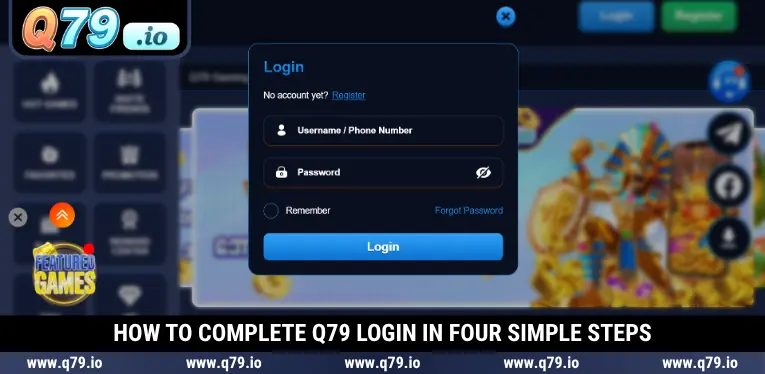
Step 1 – Visit Q79 and Open the Login Window
Open the Q79 homepage using your preferred browser and locate the Login button beside Register in the upper-right corner. Click Login to display the account access form without leaving the website. The window contains Username / Phone Number and Password fields, along with Remember, Forgot Password, and the blue Login confirmation button.
Step 2 – Enter Your Username or Registered Phone Number
In the Username / Phone Number field, enter the username or mobile number associated with your account. Players in Myanmar should carefully check their phone number and follow the format accepted by the system. Make sure the information matches the registered account rather than entering a nickname or unrelated details from your personal profile.
Step 3 – Enter Your Password and Verify the Details
Type your password into the Password field, paying attention to uppercase letters, lowercase letters, and special characters. Q79 provides an eye icon that allows you to reveal and check the entered password when necessary. Before completing Q79 Login, confirm that you are using your login password rather than the separate Transaction Password used for financial operations.
Step 4 – Confirm Login and Access Your Account
After completing both fields, you may select Remember if you are using a personal device and want to simplify future access. Click the blue Login button to submit your credentials. If the information is correct and the account is eligible for access, the system will proceed with login. Otherwise, review the displayed error message before trying again.
Helpful Account Access Features in Q79 Login
Beyond the basic username and password fields, Q79 Login includes several convenient features designed to simplify account access and reduce common mistakes. Q79 provides options for remembering login details, checking password entries, and accessing account assistance directly from the login window.
- Remember for Convenient Account Access: The Remember checkbox appears beneath the Password field and can be selected before logging in. Depending on the system’s operation, it may retain certain login information or session preferences, so it should only be enabled on trusted personal devices.
- Password Visibility for Accurate Input: The eye icon beside the Password field allows players to reveal the characters they have entered. This is particularly useful when typing longer passwords, although users should ensure that nobody nearby can view the screen.
- Forgot Password for Account Recovery: The Forgot Password link provides access to a dedicated recovery form requiring a username and email address. Players can use this option when they cannot remember their login credentials instead of repeatedly entering incorrect passwords.
- Register for New Account Creation: A Register link appears near the top of the login window for visitors who do not yet have an account. Selecting it opens the registration process, allowing eligible users to create their own login credentials.
Common Q79 Login Problems and How to Fix Them
During Q79 Login, players may occasionally encounter invalid credentials, forgotten passwords, or problems opening the login window. These issues can result from incorrect entries, network interruptions, or account-related restrictions. Before making repeated attempts, Q79 recommends checking the displayed message and reviewing the possible solutions below.
| Login Problem | Possible Cause and Solution |
| Username is not recognized | Check the registered username and avoid confusing it with the Nickname displayed in your personal profile. |
| Phone number is rejected | Verify that the number matches your registered information and follows the accepted input format. |
| Incorrect password | Check capitalization, special characters, and ensure you are not entering your Transaction Password. |
| Forgotten account password | Select Forgot Password to begin the account recovery procedure. |
| Login window does not open | Check your internet connection, refresh the website, or try another browser. |
| Unable to access a valid account | Review any system notification and contact Customer Service if further account verification is necessary. |
Important Security Tips for Safe Q79 Login
Although the login form requires only a few details, account security depends on how carefully players manage their credentials and devices. Q79 Login should always be performed through a verified website using a trusted connection. Players must also distinguish login credentials from the separate information used to authorize financial transactions.
The following precautions can help reduce unauthorized access and unnecessary security risks:
- Verify the Website Address: Always confirm that you are visiting the correct Q79 website before entering your login information. Avoid unfamiliar links or suspicious pages that imitate the official interface to collect passwords.
- Keep Login Credentials Private: Never share usernames, passwords, or verification codes with unauthorized individuals. Be particularly cautious of unsolicited messages from accounts claiming to represent customer support.
- Avoid Remember on Shared Devices: The Remember option is better suited to personal phones and computers rather than public or shared equipment. Always sign out after using another person’s device and avoid saving your password.
- Strengthen Account Protection: Choose a difficult-to-guess password, review security warnings in Personal Center, and update your contact information when necessary. Avoid reusing the same password across multiple online services.
- Monitor Unusual Account Activity: Review available account records, transaction history, and unexpected changes whenever suspicious behavior is detected. If you believe someone has accessed your account without permission, contact support for further assistance.
Managing Your Account After Successfully Logging In to Q79
Once Q79 Login is complete, players can open Personal Center to review their account details and access management functions. Q79 provides My Account, Deposit, Withdrawal, Betting Record, Account Record, and Profit and Loss sections. These categories make it easier to review betting activities, monitor transactions, and keep track of account balances through a centralized interface.
The My Account section also displays Security Level alongside Personal Information, Bank Account, Link E-wallet, and Transaction Password settings. Players should review incomplete security arrangements before conducting financial transactions. For deposits or withdrawals involving Myanmar Kyat (MMK), checking payment details and request status can help prevent avoidable errors.
How to Recover a Forgotten Q79 Login Password
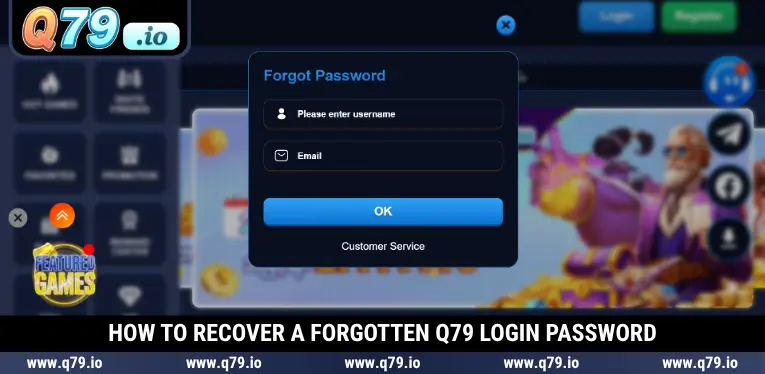
Players who forget their passwords can use the Forgot Password feature instead of repeatedly attempting different combinations. Q79 places this option directly in the login window and provides a recovery form requesting a username and email address. The same window also includes Customer Service for users who need additional assistance with account access.
Step 1 – Open Forgot Password From the Login Window
On the Q79 Login screen, locate Forgot Password to the right of Remember and select it to open the recovery form. A new window titled Forgot Password will appear with two input fields and an OK button. Review the required information before proceeding to avoid submitting incorrect account details.
Step 2 – Enter Your Username and Email Address
Enter your registered username in the field labeled Please enter username, then provide the email address associated with your account. Q79 uses these two fields to initiate the password recovery request. Ensure that both entries are accurate and avoid providing confidential details beyond those requested by the form.
Step 3 – Submit Your Request and Follow the Instructions
Click OK to submit the information and wait for the system’s response to determine the next recovery steps. If no instructions appear or you cannot access the associated email address, select Customer Service beneath the form for further assistance. Only change your password through a verified Q79 recovery procedure.
Conclusion
Q79 Login provides account access through a registered username or phone number and password, along with options for remembering credentials and recovering forgotten details. Understanding the login process, resolving common errors, and protecting personal information can help prevent unnecessary interruptions. Players can use Forgot Password or customer support when access problems occur. Sign in to Q79 to manage your account securely.

Thae Su Nyein is a featured author at Q79, contributing engaging content about online entertainment, gaming guides, platform features, and the latest gaming trends in Myanmar. With an emphasis on clear information and a reader-friendly approach, she helps audiences explore Q79’s gaming offerings, understand platform features, and stay updated on new developments and promotions. Her author profile reflects Q79’s commitment to providing accessible, informative, and locally relevant content for Myanmar readers.