

Q79 Register allows players to create an online betting account through four straightforward steps, from setting up login credentials to entering a mobile number. The registration form at Q79 uses the +95 country code and requires users to confirm that they are at least 18 years old and agree to the Terms of Use. After registration, players in Myanmar can complete their profiles, review account security, and prepare essential settings before accessing gaming services.
How to Complete Q79 Register in Four Simple Steps
The Q79 Register process takes place directly on the homepage without requiring additional software or access to another website. Q79 provides a registration form containing Username, Password, Confirm Password, and Mobile Number fields. Before starting, players should prepare an active Myanmar phone number and ensure they meet the applicable age and eligibility requirements.
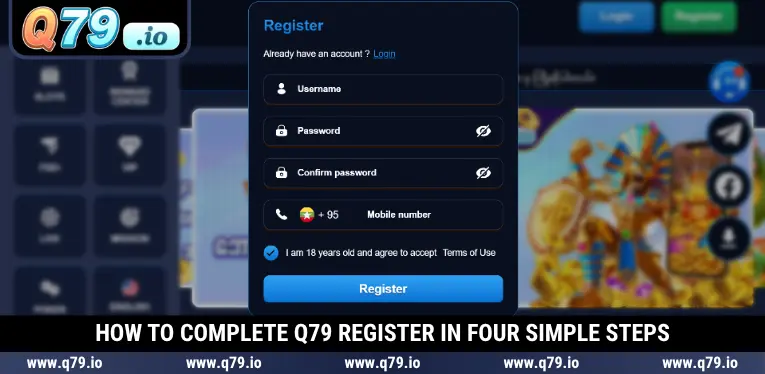
Step 1 – Visit Q79 and Open the Registration Form
Open the Q79 homepage using a mobile or desktop browser, then locate the green Register button in the upper-right corner of the screen. Click this button to open the registration window titled Register. The form displays the required fields alongside a Login link for users who already have an account.
Step 2 – Create Your Username and Password
In the Q79 Register form, enter your preferred account name in the Username field, then create a password under Password. Re-enter the same password in Confirm Password to ensure both entries match. Q79 provides an eye icon beside the password fields, allowing players to check their entries and correct typing mistakes before submitting the form.
Step 3 – Enter Your Active Myanmar Phone Number
In the Mobile Number field, the registration form displays the +95 country code alongside the Myanmar flag. Enter an active phone number using the format accepted by the system, ensuring that it belongs to you and can be accessed when necessary. Accurate contact details can make future account verification and customer support requests easier to manage.
Step 4 – Accept the Terms and Complete Registration
After completing the required fields, review the checkbox stating, “I am 18 years old and agree to accept Terms of Use.” Players must meet the age requirement and read the applicable conditions before clicking Register. Once the form is submitted, wait for the response from Q79 to confirm whether the account has been created or additional corrections are necessary.
Complete Your Personal Profile and Secure Your Q79 Account
After completing Q79 Register, players can access the Personal Center to manage their profiles and review account security. This section contains Personal Information, Login Password, Bank Account, Link E-wallet, Bind Crypto Wallet, and Transaction Password settings. Q79 also displays a Security Level indicator to help users identify incomplete security arrangements.
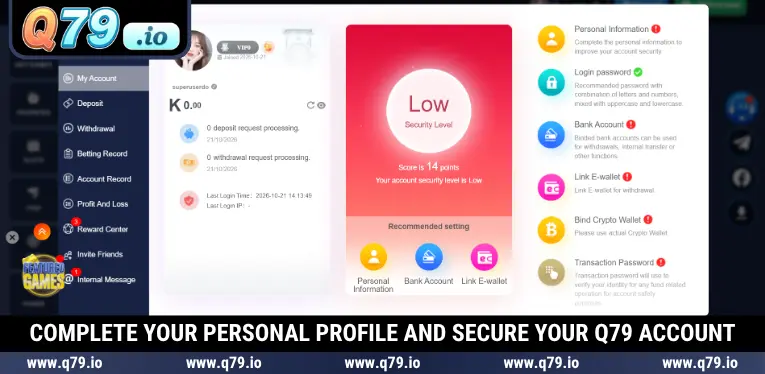
- Update Personal Information: Open the personal information section and complete fields such as Withdrawal Name, Nickname, and Email where applicable. The withdrawal name should match the relevant payment details to reduce the risk of failed withdrawal requests.
- Review Your Login Password: Check that your login password is properly configured and kept confidential. Q79 recommends combining uppercase letters, lowercase letters, and numbers to make unauthorized account access more difficult.
- Link Your Preferred Payment Method: Select Bank Account, Link E-wallet, or Bind Crypto Wallet according to the payment functions you intend to use. Enter accurate ownership details and verify the information before submitting any linked payment account.
- Set Up a Transaction Password: This separate password is used to verify money-related account operations and serves a different purpose from the login password. Follow the platform instructions and avoid sharing your transaction credentials with anyone.
- Check Your Security Level: Personal Center displays a security score and warning indicators for settings that remain incomplete. Review the marked sections, provide the necessary information, and check whether your account security status has changed.
Common Q79 Register Problems and How to Fix Them
During Q79 Register, the system may reject an application if certain fields contain incorrect information or required details are missing. Other difficulties can result from mismatched passwords, phone number formatting, or connection problems. Before submitting the form again, Q79 recommends reviewing any displayed error messages and checking the possible solutions below.
| Common Problem | Possible Cause and Solution |
| Username is not accepted | Check the required username format. If the name is already taken, try another available option. |
| Passwords do not match | Re-enter Password and Confirm Password, paying attention to capitalization and individual characters. |
| Invalid phone number | Verify the +95 country code and enter the number using the format accepted by the registration system. |
| Registration cannot be completed | Confirm that all required fields are filled in and the Terms of Use checkbox has been selected. |
| Registration form does not open | Check your internet connection, refresh the page, or try another browser if necessary. |
| Personal information cannot be saved | Review mandatory fields in Personal Information, particularly Withdrawal Name and contact details. |
Important Tips for Safe and Secure Q79 Registration
Completing the registration form is only the beginning of managing a secure gaming account. Q79 Register provides access to the platform, but financial activities and personal account management may require additional security settings. Players should follow appropriate precautions to protect their information and reduce avoidable risks.
- Access the Correct Website: Always verify the website address before entering registration information. Avoid unfamiliar links or imitation websites that copy the appearance of the official platform to collect account credentials.
- Protect Your Authentication Details: Never share your Login Password, Transaction Password, or one-time verification codes with another person. If you notice suspicious activity, review your account immediately and contact customer support.
- Use Your Own Personal Information: Registration details should belong to the legitimate account holder and remain accurate throughout account usage. Avoid linking bank accounts or digital wallets that you are not authorized to use.
- Meet the Participation Requirements: The registration form requires users to confirm that they are at least 18 years old and accept the Terms of Use. Players must also ensure that their participation complies with applicable laws in their location.
- Manage Your Betting Budget Responsibly: Creating an account does not mean players need to deposit funds or place wagers immediately. Set a reasonable entertainment budget, understand game rules, and avoid using money reserved for essential expenses.
Available Features After Completing Q79 Registration
Once Q79 Register is complete, players can browse the entertainment categories available on the homepage. Q79 provides access to Slots, Fish, Live Casino, Poker, Sports, and Lottery, offering different forms of online gaming. Additional sections such as Reward Center, VIP, and Mission allow users to review membership-related information, available tasks, and promotional benefits displayed on the platform.
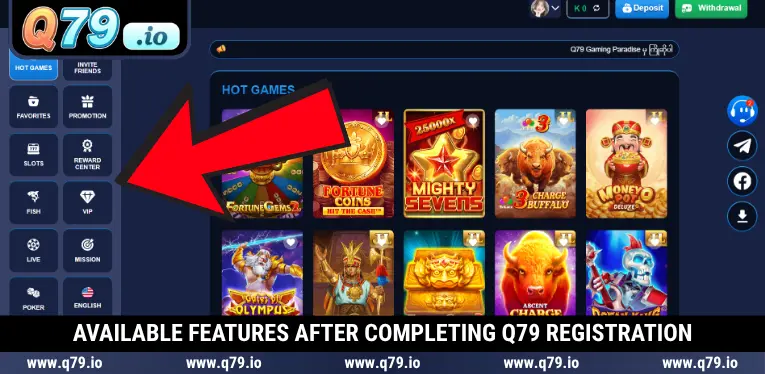
Beyond gaming products, Personal Center includes Betting Record, Account Record, and Profit and Loss sections for reviewing account activity. Players can use these records to monitor their gaming history and financial movements more effectively. Before making transactions in Myanmar Kyat (MMK), users should confirm supported payment methods, applicable conditions, and any restrictions affecting account balances or betting activities.
Conclusion
Q79 Register provides a straightforward account creation process involving a username, password, mobile number, and acceptance of the platform’s terms. After registration, completing personal details and reviewing security settings can help prevent common account issues. Players should verify their information, protect login credentials, and understand gaming rules before participating. Visit Q79 to create your account using the steps provided.

Thae Su Nyein is a featured author at Q79, contributing engaging content about online entertainment, gaming guides, platform features, and the latest gaming trends in Myanmar. With an emphasis on clear information and a reader-friendly approach, she helps audiences explore Q79’s gaming offerings, understand platform features, and stay updated on new developments and promotions. Her author profile reflects Q79’s commitment to providing accessible, informative, and locally relevant content for Myanmar readers.