

Q79 App offers dedicated versions for iOS and Android, allowing players to access online gaming services directly from their smartphones. Through QR codes or download options, Q79 helps users choose the appropriate version for their devices. Understanding the installation process, updating the app, and protecting account information can help players in Myanmar enjoy a more convenient and secure mobile gaming experience.
How to Download Q79 App on iOS and Android Devices
Q79 App provides two download options, IOS LITE-APP and Android APP, through the APP Download section of the Q79 website. Each version has a separate QR code and Click to download option, allowing users to access the appropriate installation page. The following instructions explain how to download and install the application based on the device’s operating system.
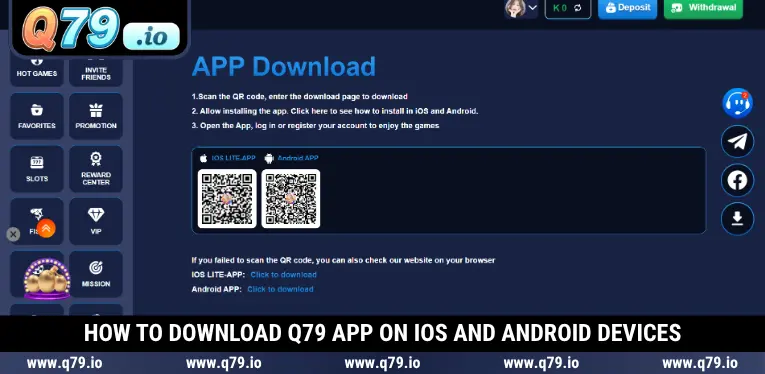
How to Download Q79 App on iPhone and iOS Devices
iPhone users can access the APP Download section through Safari to locate the IOS LITE-APP version. The platform provides a dedicated QR code alongside a direct download option, making it easier to open the correct installation page. Follow these steps to begin installing the application:
- Step 1 – Access the App Download Page: Open the Q79 website using Safari on your iPhone, then locate APP DOWNLOAD in the navigation menu. Find the IOS LITE-APP option to ensure you select the correct version rather than Android APP.
- Step 2 – Open the iOS Download Page: Click the Click to download option beside IOS LITE-APP or scan the dedicated QR code using your iPhone camera. Verify the download page address and review the instructions displayed before proceeding.
- Step 3 – Install the App on Your iPhone: If the download page provides a web app, use Safari’s Share menu and select Add to Home Screen when supported. If a directly installed application is provided, verify the developer and follow the applicable iOS installation procedure.
- Step 4 – Launch the App and Sign In: Once installation is complete, open the application icon from your device’s home screen. Select Login to access an existing account or Register to create a new account if you meet the eligibility requirements.
How to Download Q79 App on Android Smartphones
Android users can find the Android APP option directly in the download section of Q79. This version has its own QR code and Click to download option for accessing the installation page. Players should verify the distribution source and follow the instructions below:
- Step 1 – Open the Android APP Section: Visit the Q79 website using Chrome or another compatible Android browser, then select APP DOWNLOAD. Locate Android APP to ensure you are accessing the version intended for your smartphone.
- Step 2 – Download the Application File: Select Click to download or scan the Android QR code to open the download page. If an APK file is provided, wait for the download to finish and locate the file in your Downloads folder.
- Step 3 – Install the Application: Open the downloaded APK file and review the instructions displayed by Android. If the device requests Install unknown apps permission, proceed only after verifying the source and confirming that no serious security warnings are present.
- Step 4 – Complete Installation and Access Your Account: Select Install when your device permits the installation, then launch the application from the home screen. Sign in using your registered credentials and disable installation permission from external sources when it is no longer required.
Comparing Q79 App Versions for iOS and Android
Both versions of Q79 App are available through the platform’s APP Download section, although installation procedures and distribution formats may differ between operating systems. Q79 provides separate QR codes to help users avoid selecting an incompatible version. Before downloading, check your device type and the corresponding requirements below.
| Feature | IOS LITE-APP | Android APP |
| Compatible devices | iPhones and supported iOS devices | Compatible Android smartphones |
| Download option | IOS LITE-APP | Android APP |
| Access method | QR code or Click to download | QR code or Click to download |
| Recommended browser | Safari | Chrome or Android browser |
| Installation process | Depends on the actual distribution method | Depends on the installation package, potentially APK |
| Security checks | Verify developer identity and certificates where applicable | Verify APK source and Google Play Protect warnings |
Key Benefits of Downloading Q79 App on Your Smartphone
Using Q79 App provides an alternative to manually opening the website whenever players want to access gaming services. Q79 focuses on mobile accessibility, allowing users to reach supported account functions and gaming categories through their smartphones. The following benefits depend on the features available in the installed version.
- Convenient Access From Your Home Screen: When the installed version supports a home screen shortcut, players can launch the platform directly by tapping its icon. This reduces the need to enter the website address manually whenever they want to access their accounts.
- Access to Multiple Gaming Categories: Q79 offers Slots, Fish, Live Casino, Poker, Sports, and Lottery categories. Players can navigate between available entertainment options through the platform’s organized gaming interface.
- Mobile Account and Transaction Management: Features such as Personal Center, Deposit, Withdrawal, and Account Record help users review personal details and financial activity. Availability may depend on the application version and account status.
- Convenient Access to Membership Features: Reward Center, VIP, and Mission sections provide information about membership activities, promotional offers, and available rewards. Players should review the relevant eligibility conditions before joining any promotion.
- Flexible Options for Different Devices: Dedicated iOS and Android download versions allow users to select an installation method suited to their smartphones. Separate download pages also reduce confusion between operating systems.
How to Update Q79 App to the Latest Version
To update Q79 App on iOS, visit APP Download on the Q79 website and check the latest installation instructions. Web apps may update automatically, while separately installed applications follow their original distribution method. Always verify the download source before proceeding.
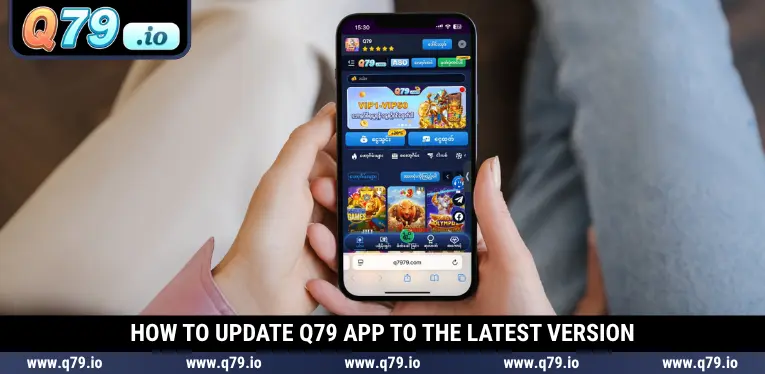
For Android, download the latest APK from a verified source if an update is available. Install it according to the on-screen instructions, then reopen the app to check its functionality. Contact Customer Service if any issues occur.
Common Q79 App Download and Installation Problems
When installing Q79 App, players may encounter download errors, storage limitations, or device compatibility issues. Q79 recommends checking the internet connection, available storage, and security settings to identify the problem and complete installation safely.
| Common Problem | Possible Cause and Recommended Solution |
| QR code cannot be scanned | Check camera functionality and lighting, or use Click to download instead. |
| Download page does not open | Verify your internet connection, website address, and browser compatibility. |
| APK file cannot be downloaded | Check available storage space and the browser’s download status. |
| Android blocks installation | Review source permissions, compatibility requirements, and Play Protect warnings. |
| iPhone cannot open the app | Check the installation method, iOS compatibility, and developer verification where applicable. |
| App closes unexpectedly | Restart the application, check connectivity, and look for an appropriate updated version. |
Important Security Precautions Before Downloading Q79 App
Before installing Q79 App, users should verify the download source and examine any permissions requested by their devices. Applications distributed outside official app stores may introduce additional security risks if installation files are modified or impersonated. Q79 provides dedicated QR codes and download options, but confirming the authenticity of the source remains essential.
- Verify the Download Source: Access APP Download through the verified Q79 website rather than unfamiliar links. Avoid installation files distributed through unsolicited social media messages or unverified accounts using similar branding.
- Do Not Ignore Security Warnings: iOS and Android include protection mechanisms for applications installed outside standard distribution channels. Investigate warnings about unknown developers, suspicious certificates, or harmful software instead of disabling security protections.
- Review Application Permissions: Check requests involving camera access, storage, notifications, and personal information. Avoid granting permissions that are unnecessary or unrelated to the application’s intended functions.
- Protect Your Account Credentials: Never disclose your Login Password, Transaction Password, or verification codes during installation or updates. Enter account details only after confirming that the application and login interface are legitimate.
- Follow Eligibility and Responsible Gaming Requirements: Players must meet the applicable age restrictions and legal requirements in their location. Set a reasonable entertainment budget and recognize the financial risks associated with online betting.
Conclusion
Q79 App provides dedicated iOS and Android download options through QR codes and direct installation pages. Players should select the correct version, follow the appropriate setup procedure, and check for updates when new releases become available. Verifying the download source and protecting account credentials remain essential for safe mobile access. Visit APP Download at Q79 to choose the version compatible with your smartphone.

Thae Su Nyein is a featured author at Q79, contributing engaging content about online entertainment, gaming guides, platform features, and the latest gaming trends in Myanmar. With an emphasis on clear information and a reader-friendly approach, she helps audiences explore Q79’s gaming offerings, understand platform features, and stay updated on new developments and promotions. Her author profile reflects Q79’s commitment to providing accessible, informative, and locally relevant content for Myanmar readers.