

Q79 Withdrawal allows players to manage cashout requests through e-wallets, bank accounts, and cryptocurrency wallets within one convenient interface. Before submitting a transaction, Q79 displays available balances, wagering turnover requirements, and withdrawal processing information to help users review their eligibility. Players in Myanmar should link accurate payment details, configure their transaction passwords, and monitor withdrawal requests after submission.
How to Withdraw Money From Q79 in Five Simple Steps
The Q79 Withdrawal process takes place in Personal Center, where account management and financial functions are organized together. Q79 displays available withdrawal methods, Central Wallet, Available Amount, and wagering turnover requirements. Before proceeding, players should log in, prepare a linked payment account, and confirm that their balance is eligible for withdrawal.
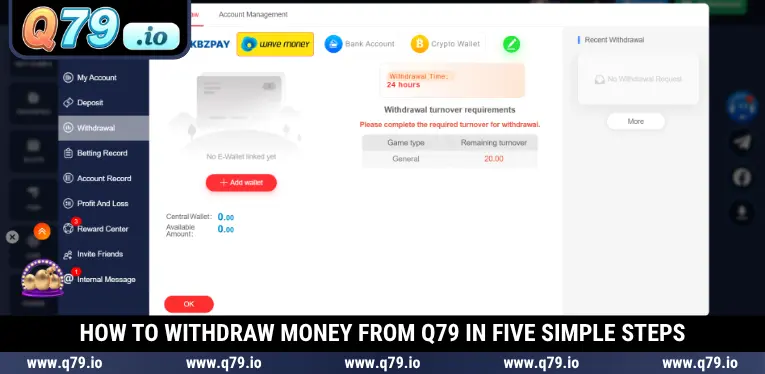
Step 1 – Log Into Q79 and Open the Withdrawal Section
Visit the Q79 homepage and sign in using your registered account credentials. Select Withdrawal from the main navigation bar or open Personal Center and click Withdrawal in the left-hand menu. The system will display the withdrawal interface with KBZPay, Wave Money, Bank Account, and Crypto Wallet options. Review the selected payment method before continuing.
Step 2 – Choose Your Withdrawal Method and Link an Account
In the Q79 Withdrawal interface, select your preferred e-wallet, bank account, or cryptocurrency wallet. If no payment account has been linked, the system may display No E-Wallet linked yet or request additional payment information. Click Add Wallet or switch to Account Management to enter the account holder’s details and complete the required payment settings.
Step 3 – Check Your Available Balance and Turnover Requirements
After choosing a withdrawal method, review Central Wallet and Available Amount to determine the funds available for withdrawal. Q79 also displays Withdrawal turnover requirements, including the game category and remaining wagering turnover. If the conditions have not been fulfilled, identify the outstanding requirement before attempting to submit a withdrawal request.
Step 4 – Enter the Withdrawal Amount and Confirm Your Request
Once the receiving account is linked and the necessary conditions are satisfied, follow the withdrawal form displayed by the system. Check the amount, recipient information, and any authentication requirements before confirming. Q79 provides a separate Transaction Password feature to help protect financial operations and verify account-related payment activities.
Step 5 – Monitor Your Withdrawal Status
After successfully submitting a request, open Recent Withdrawal to review the latest transaction information. The More button provides access to additional withdrawal records where available. If the request does not appear, verify whether the original submission was completed before attempting another transaction to avoid creating duplicate requests.
Available Q79 Withdrawal Methods and Payment Options
Q79 displays four primary withdrawal options, allowing players to select a receiving method that suits their payment preferences. During Q79 Withdrawal, each option may require different account information, including recipient names, wallet numbers, or cryptocurrency addresses. Players should verify that their chosen method is available and properly configured before submitting a request.
| Withdrawal Method | Required Account Information | Main Features |
| KBZPay | Wallet holder’s name and KBZPay account number | Receives eligible withdrawals through the KBZPay e-wallet service. |
| Wave Money | Recipient name and WavePay account number | Supports e-wallet linking through Account Management. |
| Bank Account | Account holder’s name and relevant bank details | Allows withdrawals to supported bank accounts. |
| Crypto Wallet | Cryptocurrency wallet address and compatible network | Requires accurate wallet details and network compatibility. |
How to Link a Payment Account for Q79 Withdrawal
Before submitting a Q79 Withdrawal request, players should complete the receiving account information in Account Management. Q79 organizes this section into E-wallet, Bank Account, and Crypto Wallet categories, allowing users to select the appropriate payment type. For e-wallet registration, the form includes recipient details, wallet type, account number, and Transaction Password settings when required.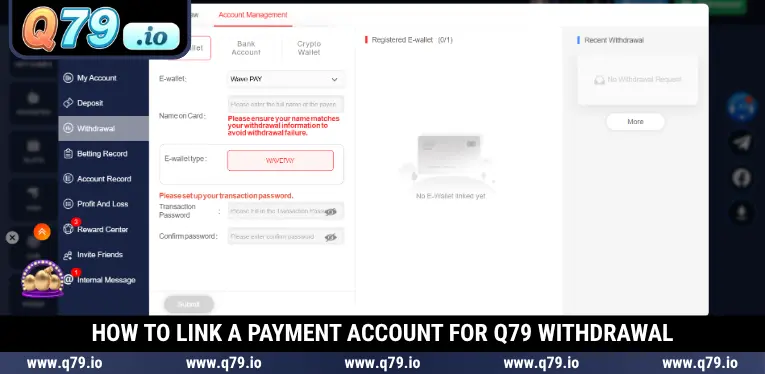
The following steps explain how to configure a receiving account:
- Select the Account Type: Open Account Management and choose E-wallet, Bank Account, or Crypto Wallet. Confirm that the selected category matches your intended withdrawal method before entering payment details.
- Enter the Correct Recipient Name: Provide the account holder’s name in the Name on Card field using the details associated with your payment account. Q79 warns that mismatched withdrawal information may cause transactions to fail.
- Provide Your Receiving Account Number: For Wave Money, select WAVE PAY and enter the corresponding wallet number in Account Number. Other payment methods should be configured using the fields displayed in their respective registration forms.
- Create a Transaction Password: If you have not configured a transaction password, enter it in Transaction Password and repeat it in Confirm Password. Keep this credential separate from your login password and never disclose it to unauthorized individuals.
- Submit and Verify the Linked Account: Review all entered information and click Submit once the required fields are complete. Check the registered account section afterward to confirm that the receiving method has been successfully added.
Understanding Withdrawal Turnover Rules and Processing Time
One important requirement of Q79 Withdrawal is completing any outstanding wagering turnover before funds become eligible for withdrawal. The Q79 interface includes a Withdrawal turnover requirements table showing Game type and Remaining turnover. In the provided screenshot, the General category displays a remaining value of 20.00, indicating that the account has an outstanding requirement.
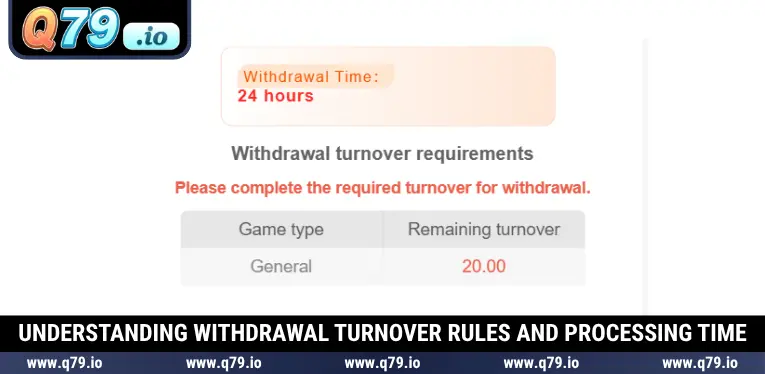
The Withdrawal section also displays Withdrawal Time: 24 hours. This is the processing time shown by the platform, but the actual time required for funds to reach a receiving account may depend on verification, request status, and the selected payment provider. Players should review their transaction records before assuming that a delayed withdrawal has failed.
Common Q79 Withdrawal Problems and How to Fix Them
During Q79 Withdrawal, players may encounter difficulties when payment accounts are not linked, turnover requirements remain incomplete, or authentication details are incorrect. Q79 displays certain warnings directly within Withdrawal and Account Management, helping users identify missing settings before attempting another request.
| Common Problem | Possible Cause and Recommended Solution |
| No E-Wallet linked yet | No receiving wallet has been registered. Select Add Wallet to configure one. |
| Unable to withdraw funds | Check Available Amount and any outstanding Remaining turnover requirements. |
| Recipient name does not match | Verify that Name on Card matches the registered payment account holder’s details. |
| Payment account registration fails | Review all required fields, Account Number, and Transaction Password settings. |
| Withdrawal method is unavailable | Confirm that the receiving account is properly linked and the payment option is supported. |
| Withdrawal request is not displayed | Check Recent Withdrawal or select More to review additional transaction records. |
Important Safety Tips for Q79 Withdrawal Transactions
Protecting financial information and verifying account eligibility are essential when using Q79 Withdrawal. Players should manage receiving accounts under their own names and confirm that funds are eligible before submitting requests. The following precautions help reduce payment errors and support transaction verification if an issue occurs.
- Use Payment Accounts Registered in Your Name: Recipient details should match the personal information associated with your account. Avoid using another person’s payment account without satisfying the platform’s ownership and verification requirements.
- Review Turnover Requirements Before Withdrawing: Check Remaining turnover and any applicable conditions before submitting a request. Avoid increasing bets simply to recover previous losses, as gambling involves financial risk and uncertain outcomes.
- Protect Your Transaction Password: Keep your Transaction Password confidential and never share it through private messages. Avoid storing sensitive credentials on public computers or devices shared with other users.
- Verify Cryptocurrency Wallet Details: When choosing Crypto Wallet, carefully check the receiving address, blockchain network, and supported digital asset. Sending cryptocurrency to an incompatible network or incorrect address can result in irreversible losses.
- Keep Records of Withdrawal Requests: Record the withdrawal amount, submission time, and transaction status for future reference. When contacting support, provide only the necessary details and never disclose passwords or authentication codes.
How to Check Your Q79 Withdrawal History and Request Status
After submitting a Q79 Withdrawal request, players can review the Recent Withdrawal panel on the right side of the transaction window. When no request has been recorded, the system displays No Withdrawal Request. Select More to access additional withdrawal history where available, making it easier to determine whether a transaction has been registered.
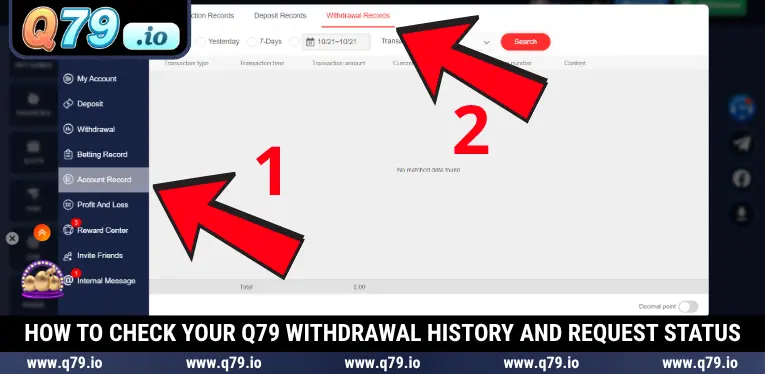
In addition, Q79 provides Account Record and Profit and Loss sections within Personal Center for reviewing account activity. If a balance discrepancy occurs or a withdrawal request remains unresolved, contact Customer Service with the relevant transaction details. Checking existing records before creating another request can help prevent confusion and duplicate submissions.
Conclusion
Q79 Withdrawal provides cashout options through KBZPay, Wave Money, bank accounts, and cryptocurrency wallets, each requiring appropriate payment details. Before submitting a request, players should review available balances, outstanding turnover requirements, and transaction security settings. Monitoring withdrawal history helps identify payment status and address potential issues. Open Personal Center at Q79 to review your receiving account and available withdrawal options.

Thae Su Nyein is a featured author at Q79, contributing engaging content about online entertainment, gaming guides, platform features, and the latest gaming trends in Myanmar. With an emphasis on clear information and a reader-friendly approach, she helps audiences explore Q79’s gaming offerings, understand platform features, and stay updated on new developments and promotions. Her author profile reflects Q79’s commitment to providing accessible, informative, and locally relevant content for Myanmar readers.