

Q79 Deposit offers multiple online payment methods, allowing players to choose an option that suits their preferences and budget. From local e-wallets to bank transfers and cryptocurrency, Q79 displays deposit limits, cashback rates, and relevant payment details before submitting a request. Players in Myanmar can select their preferred payment method, review available promotions, and track deposit transactions directly through their accounts.
How to Deposit Money at Q79 in Five Simple Steps
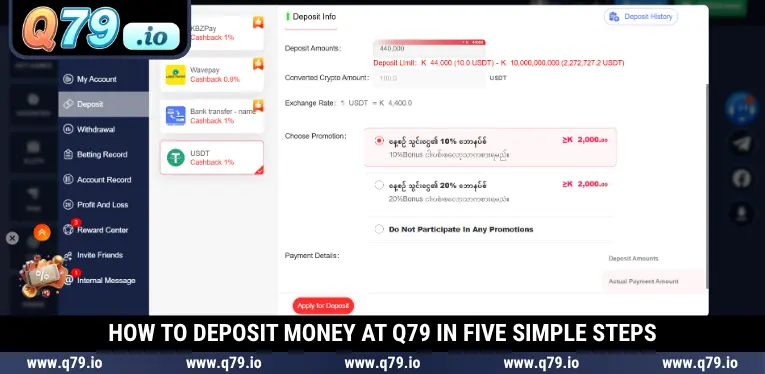
The Q79 Deposit process takes place in Personal Center after players successfully log into their accounts. The Deposit Info section displays available payment methods, amount fields, and promotional options. Q79 also provides a Deposit History feature, allowing users to review previous requests without navigating through several account management pages.
Step 1 – Log Into Q79 and Access the Deposit Section
Visit the Q79 homepage and sign in using your registered account credentials. Next, click the blue Deposit button in the upper navigation bar or open Personal Center and select Deposit from the left-hand menu. The Deposit Info window will appear, displaying the available payment options and the corresponding transaction fields.
Step 2 – Choose Your Preferred Deposit Method
In the Q79 Deposit interface, players can select KBZPay, WavePay, Bank Transfer, or USDT. Each method has a separate payment form, so reviewing the displayed requirements is essential before proceeding. E-wallet transactions include processing options such as TQPAY and MM8PAY, while bank transfers offer KBZ Bank, AYA Bank, and CB Bank.
Step 3 – Enter Your Payment Details and Deposit Amount
After selecting a payment method, complete the required fields shown on the screen. Q79 may request a Payment Card Number for e-wallet transactions, a Full Name for bank transfers, or a Deposit Amount for USDT payments. Enter an amount within the permitted limits and carefully review the relevant information before submitting your request.
Step 4 – Select an Available Deposit Promotion
Below the deposit amount field, the Choose Promotion section displays available bonus options and their corresponding conditions. Players can review the requirements and select an eligible offer if they wish to participate. Q79 also provides a Do Not Participate In Any Promotions option for users who prefer to deposit without choosing a promotional reward.
Step 5 – Submit Your Deposit and Track the Transaction
Review the selected payment method, deposit amount, and submitted details before clicking Apply for Deposit. The system will receive the request and may display further payment instructions depending on the selected method. Follow the information provided during the transaction and open Deposit History afterward to check the recorded status of your request.
Available Q79 Deposit Methods, Limits, and Cashback Rates
Q79 offers several payment methods supporting transactions in Myanmar Kyat (MMK) or USDT. Within the Q79 Deposit interface, each method is displayed with its corresponding cashback rate and transaction limits. Players should verify these details before depositing, as limits and promotional conditions may change depending on the payment channel.
| Payment Method | Deposit Limit Per Request | Displayed Cashback |
| KBZPay | 2,000–1,000,000 MMK | 1% |
| WavePay | 2,000–1,000,000 MMK | 0.9% |
| Bank Transfer | 10,000–100,000,000 MMK | 1% |
| USDT | 44,000–10,000,000,000 MMK | 1% |
Understanding Each Payment Method Available at Q79
Each deposit option has different payment details and transaction requirements. Understanding these differences helps players complete Q79 Deposit correctly, particularly when using bank transfers or cryptocurrency. Q79 displays the relevant input fields after the selected payment method is opened.
Depositing Through KBZPay and WavePay
KBZPay and WavePay are two e-wallet methods available in the Deposit section. Players must select the appropriate processing channel, enter the Payment Card Number, and specify the Deposit Amount. Q79 displays 1% cashback for KBZPay and 0.9% for WavePay, with deposit amounts ranging from 2,000 to 1,000,000 MMK per request.
Making Deposits Through Bank Transfers
Bank Transfer allows players to choose from supported options such as KBZ Bank, AYA Bank, and CB Bank. The payment form requests a Full Name and Deposit Amount, with displayed limits ranging from 10,000 to 100,000,000 MMK. Players should ensure their payment account details are accurate and review the transfer instructions before proceeding.
Depositing With USDT and Checking Exchange Rates
USDT is available for players using supported cryptocurrency wallets. The Q79 interface displays Deposit Amount, Converted Crypto Amount, and Exchange Rate fields. In the supplied screenshot, the displayed exchange rate is 1 USDT = 4,400 MMK, with a minimum deposit equivalent to 10 USDT. This is a platform-displayed rate at the time of the screenshot, not a guaranteed fixed exchange rate.
Cashback Rewards and Promotional Choices for Q79 Deposits
In addition to payment methods, Q79 Deposit displays cashback rates and bonus selections during the transaction process. Cashback is associated with individual payment methods, while promotional offers may carry separate eligibility conditions, wagering requirements, or withdrawal restrictions. Players should understand that these two types of benefits are not necessarily governed by identical terms.
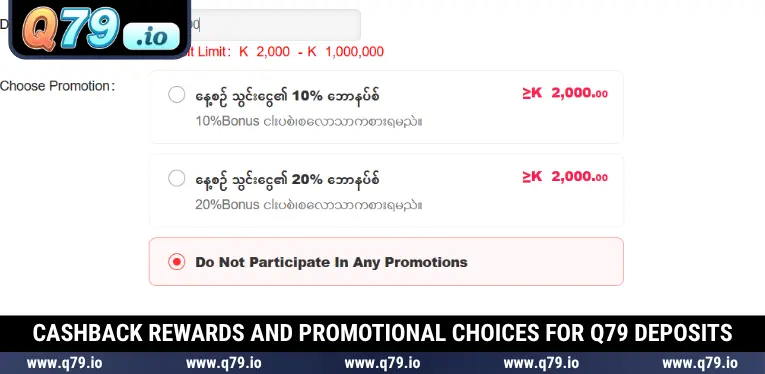
Q79 also includes an option to proceed without joining a promotion. Before selecting an offer, players should review the advertised reward, its participation conditions, and any restrictions affecting withdrawals. A displayed cashback percentage does not automatically mean that the credited reward can be withdrawn immediately without meeting additional requirements.
Common Q79 Deposit Problems and How to Resolve Them
During Q79 Deposit, payment requests may encounter issues caused by incorrect details, amounts outside the supported limits, or incomplete transaction steps. When a problem occurs, players should check the existing request status before creating another transaction. Q79 provides Deposit History to assist with reviewing recorded payment information.
| Common Issue | Possible Cause and Recommended Solution |
| Invalid deposit amount | Check the minimum and maximum limits for the selected payment method. |
| Incorrect Payment Card Number | Verify the e-wallet or payment channel details before entering the information again. |
| Full Name does not match | Confirm that the entered name corresponds to the relevant bank account details. |
| Promotion cannot be selected | Review eligibility requirements or choose the option to proceed without a promotion. |
| Unexpected USDT conversion | Check the displayed Exchange Rate and converted amount before confirming the payment. |
| Deposit balance not updated | Review Deposit History and contact Customer Service if the transaction requires investigation. |
Important Precautions Before Depositing Funds at Q79
Although the Q79 Deposit interface presents payment details clearly, players should still verify all information before confirming a request. Incorrect account names, deposit amounts, or payment channels may complicate transaction verification. The following precautions can help reduce avoidable errors when transferring funds.
- Check Deposit Limits Before Transferring Funds: Each payment method has different transaction restrictions, particularly between e-wallets and bank transfers. Select an amount within the permitted range and avoid splitting payments simply to bypass platform limits.
- Verify Payment Recipient Information: Follow the payment instructions displayed during the Q79 transaction process. Never transfer funds to unfamiliar accounts based on private messages or payment requests that have not been verified.
- Review Cashback and Bonus Conditions: Cashback rewards and promotional bonuses may involve different participation or wagering requirements. Read the applicable terms carefully before selecting an offer to avoid misunderstanding when funds become eligible for withdrawal.
- Confirm Exchange Details for USDT: The conversion rate between USDT and MMK may vary depending on the platform or transaction time. Check the cryptocurrency amount, supported network, and wallet information before confirming a transfer.
- Keep Transaction Records for Reference: Save relevant payment references, transaction amounts, and submission times when contacting support. Never disclose passwords, verification codes, or confidential account credentials during payment inquiries.
How to Check Your Q79 Deposit History and Transaction Status
After submitting a Q79 Deposit request, players can select Deposit History in the upper-right corner of the Deposit Info window. This section allows users to review recorded deposit requests and check the transaction information available in the system. Keeping payment details accessible is particularly useful when investigating deposits that have not yet appeared in the account balance.
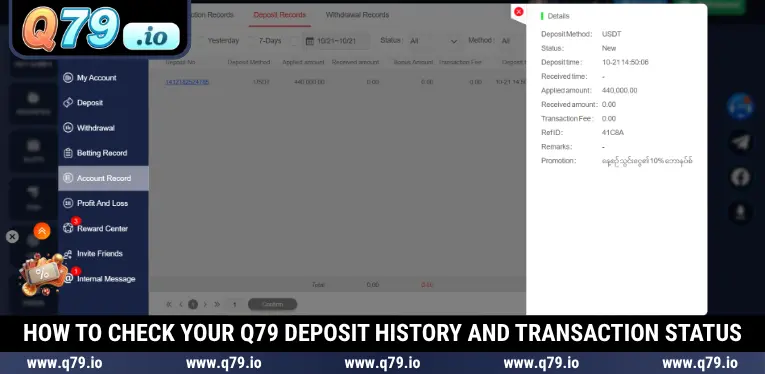
In addition to Deposit History, Q79 provides Account Record and other account management functions within Personal Center. Players can use these sections to review balance changes and related transaction activity. If a discrepancy occurs, contact Customer Service with the payment reference, transaction time, and amount so the issue can be reviewed.
Conclusion
Q79 Deposit supports payments through KBZPay, WavePay, bank transfers, and USDT, each with its own limits and cashback rates. Selecting the correct method, checking exchange rates, and reviewing promotional conditions help players manage deposit requests more effectively. Users should monitor their transaction history and protect financial information throughout the payment process. Open the Deposit section at Q79 to review the available options.

Thae Su Nyein is a featured author at Q79, contributing engaging content about online entertainment, gaming guides, platform features, and the latest gaming trends in Myanmar. With an emphasis on clear information and a reader-friendly approach, she helps audiences explore Q79’s gaming offerings, understand platform features, and stay updated on new developments and promotions. Her author profile reflects Q79’s commitment to providing accessible, informative, and locally relevant content for Myanmar readers.